> ## Documentation Index
> Fetch the complete documentation index at: https://docs.chainloop.dev/llms.txt
> Use this file to discover all available pages before exploring further.
# AI Code Security Analysis
> How Chainloop compiles a repository's security-fix history into an AI Security Context, a map of where the next vulnerability is most likely to live, and uses it to prevent regressions, hunt un-patched variants, and measure security hygiene over time.
This is a preview/beta feature. Further changes are expected.
## Overview
A codebase's own history of security fixes is the best available map of where its *next* vulnerability lives. Bugs cluster in the same components, the same kinds of dangerous operations, and the same vulnerability classes, and a guard added on one code path is very often missing on a sibling path.
**AI Code Security Analysis** is a built-in Chainloop [workflow](/concepts/workflows) that acts on that premise. It reads a repository's history of security fixes and turns it into a machine-readable map of where that codebase tends to go wrong. Chainloop clones the connected repository into a sandbox it manages, walks its recent commits, keeps the ones that fixed a real security bug, and compiles them into an **AI Security Context**: a signed [`CHAINLOOP_AI_SECURITY_CONTEXT`](/concepts/material-types) attestation stored alongside the rest of your evidence.
The map is worth reading on its own: a record of what a project has had to fix, where, and what check made it right. It also seeds an agent that hunts for the *un-patched siblings* of those fixes in the current code.
 ## What It's For
Most security tooling looks at a codebase as it is today and compares it against a generic ruleset or a database of known CVEs. Neither knows anything about *this* project: which components have broken before, which guards keep getting forgotten, or how long past bugs went unnoticed. The AI Security Context records that, and three things follow from it.
### Prevent Regressions Before They Merge
The fix history tells you what kind of vulnerability this codebase tends to introduce, and where. Once that is compiled into a map, the changes in a pull request can be compared against the known weak spots: a diff that touches a hot component, reaches a dangerous operation the project has guarded before, or skips a check that a past fix established. Whoever is writing the code, a human or a coding agent, learns *before* the change lands that they are working somewhere the project has already been burned, and can avoid reintroducing a class of bug the team has paid to fix once.
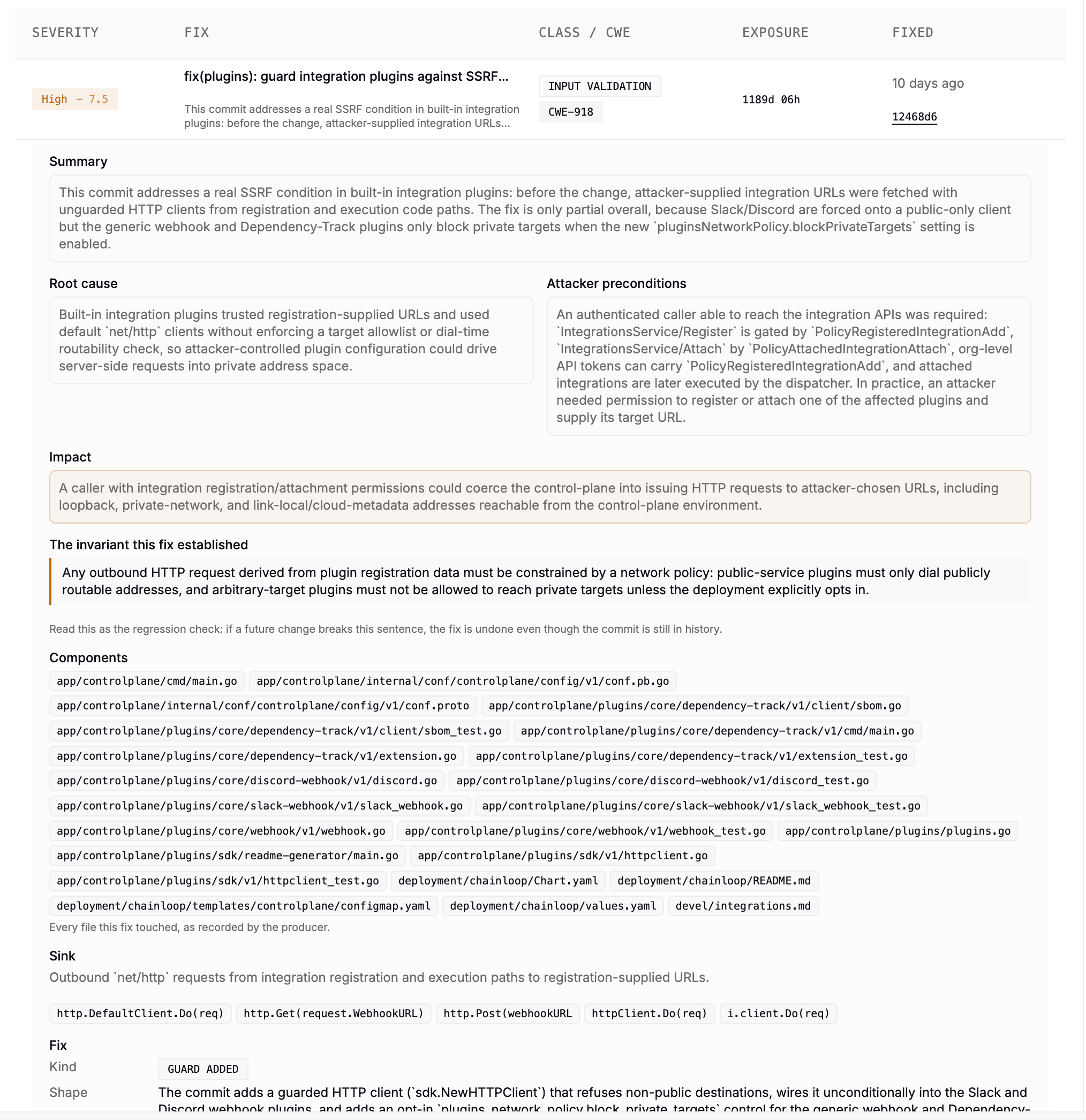
Each confirmed fix records the invariant it established, in plain language, so it can be read as a regression check: if a future change breaks that sentence, the fix is undone even though the commit is still in history.
## What It's For
Most security tooling looks at a codebase as it is today and compares it against a generic ruleset or a database of known CVEs. Neither knows anything about *this* project: which components have broken before, which guards keep getting forgotten, or how long past bugs went unnoticed. The AI Security Context records that, and three things follow from it.
### Prevent Regressions Before They Merge
The fix history tells you what kind of vulnerability this codebase tends to introduce, and where. Once that is compiled into a map, the changes in a pull request can be compared against the known weak spots: a diff that touches a hot component, reaches a dangerous operation the project has guarded before, or skips a check that a past fix established. Whoever is writing the code, a human or a coding agent, learns *before* the change lands that they are working somewhere the project has already been burned, and can avoid reintroducing a class of bug the team has paid to fix once.
Each confirmed fix records the invariant it established, in plain language, so it can be read as a regression check: if a future change breaks that sentence, the fix is undone even though the commit is still in history.
 ### Find First-Party Vulnerabilities With Adversarial Analysis
Scanners find known CVEs in dependencies, and pattern matchers find what their rules describe. Neither finds a novel flaw in your own code, which is the class that causes incidents. The AI Security Context turns that open-ended hunt into a targeted one: if a handful of components and a handful of vulnerability classes account for most of the project's past fixes, an adversarial pass can concentrate on those areas first, try to reach the same dangerous operations through paths the original fixes did not cover, and attempt to exploit them. Roughly half of the findings in our own runs came straight from the mined history, a yield a scan without it can't reproduce.
What comes back is a lead list, not a verdict. Findings land in the project's **Security** tab alongside the rest, where you or an agent triage them and record a formal decision through [Vulnerability Management and Risk Assessment](/concepts/vulnerability-management): affected or not, with the justification and evidence attached, versioned and signed.
### Measure the Security Hygiene of a Project Over Time
Because every confirmed fix is dated and classified, the context is also a historical record of how the team handles security. It shows how quickly vulnerabilities are found and patched, how long they stayed exposed, which classes keep recurring, and whether the risk profile is improving or drifting from one scan to the next. That is evidence for audits and security reviews, and a way to judge the security posture of a codebase you are about to depend on.
### Find First-Party Vulnerabilities With Adversarial Analysis
Scanners find known CVEs in dependencies, and pattern matchers find what their rules describe. Neither finds a novel flaw in your own code, which is the class that causes incidents. The AI Security Context turns that open-ended hunt into a targeted one: if a handful of components and a handful of vulnerability classes account for most of the project's past fixes, an adversarial pass can concentrate on those areas first, try to reach the same dangerous operations through paths the original fixes did not cover, and attempt to exploit them. Roughly half of the findings in our own runs came straight from the mined history, a yield a scan without it can't reproduce.
What comes back is a lead list, not a verdict. Findings land in the project's **Security** tab alongside the rest, where you or an agent triage them and record a formal decision through [Vulnerability Management and Risk Assessment](/concepts/vulnerability-management): affected or not, with the justification and evidence attached, versioned and signed.
### Measure the Security Hygiene of a Project Over Time
Because every confirmed fix is dated and classified, the context is also a historical record of how the team handles security. It shows how quickly vulnerabilities are found and patched, how long they stayed exposed, which classes keep recurring, and whether the risk profile is improving or drifting from one scan to the next. That is evidence for audits and security reviews, and a way to judge the security posture of a codebase you are about to depend on.
 ## How It Works
AI Code Security Analysis is a recall-first funnel: a cheap first pass casts a wide net over history, and progressively more careful stages do the precision work. The result is a context compiled deterministically from what the earlier stages confirmed.
```mermaid theme={"dark"}
flowchart LR
repo[(Connected
## How It Works
AI Code Security Analysis is a recall-first funnel: a cheap first pass casts a wide net over history, and progressively more careful stages do the precision work. The result is a context compiled deterministically from what the earlier stages confirmed.
```mermaid theme={"dark"}
flowchart LR
repo[(Connected
repository)] --> classify[Classify
each commit]
classify -->|likely fixes| investigate[Investigate
each candidate]
investigate -->|confirmed fixes| compile[Compile the
AI Security Context]
compile --> ctx[[CHAINLOOP_AI_SECURITY_CONTEXT]]
ctx --> hunt[Hunt un-patched
variants at HEAD]
```
* **Classify.** A lightweight pass reads each commit's diff and asks a single question: *did this fix a security bug?* It is tuned for recall, deliberately over-including, because the base rate of security fixes in ordinary history is low (roughly 1–2% of commits).
* **Investigate.** Each candidate is examined more carefully in an isolated, read-only pass that characterizes the fix: what class of bug it was, where it lived, what makes a call site safe, and how the claim can be checked. Candidates that turn out to be features, refactors, or unreachable hardening are dropped here.
* **Compile.** A deterministic step, with no model involved, groups the confirmed fixes and recency-weights them into the AI Security Context. Because everything it emits is sorted, two runs over identical history produce identical output, so the material diffs cleanly across scans.
* **Hunt.** The compiled context seeds an agent that reads the *current* code at HEAD and looks for the un-patched siblings the map predicts, returning findings it can back up.
Scans are **incremental**: a later run only walks commits it hasn't seen, accumulating coverage over time rather than re-scanning from scratch.
### What the Context Gives You
The context is a compiled view of a repository's security history, organized so that both people and agents can act on it. It surfaces:
* **Hot components** — the files and areas that have needed the most, most recent, and most severe fixes.
* **Shared surfaces** — a rule that must hold at *every* path reaching the same kind of dangerous operation, backed by the fixes that established it.
* **Confirmed security fixes** — each past fix with its class, severity, a plain-language summary, root cause, attacker preconditions, impact, and the components it touched.
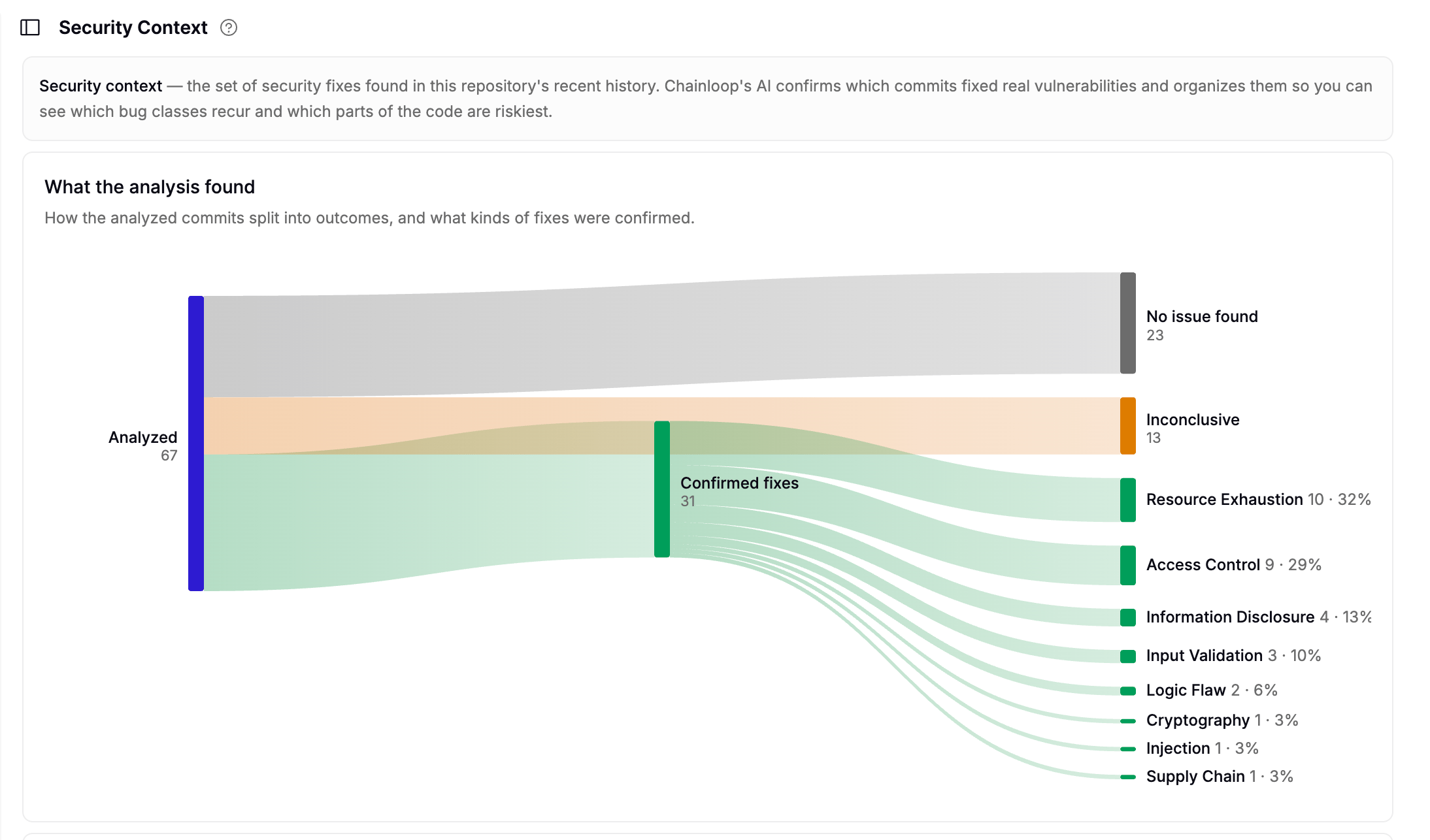
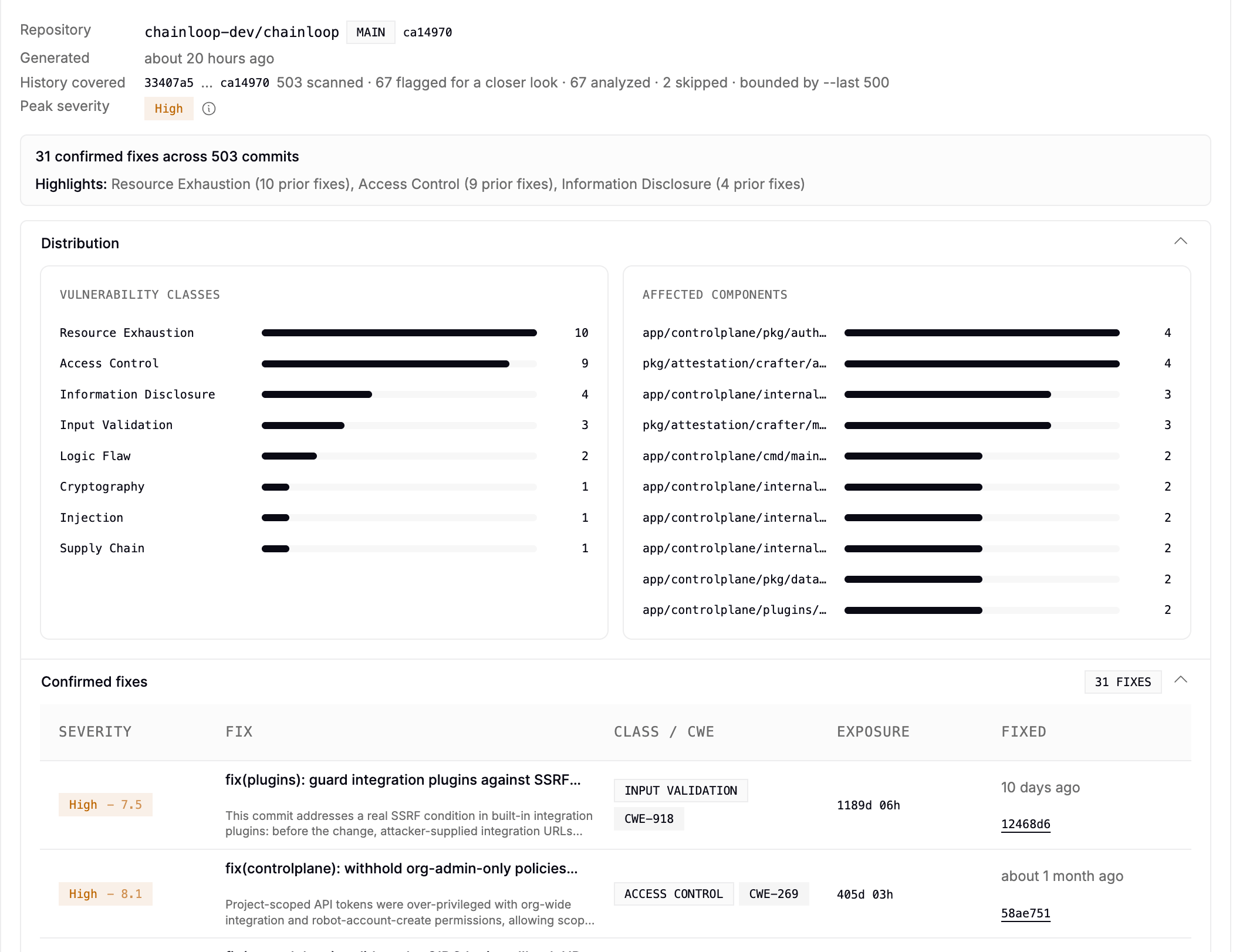
* **Class distribution** — how a project's fixes break down across a stable set of vulnerability classes (access control, injection, cryptography, information disclosure, input validation, resource exhaustion, and so on).
Every claim in it is **independently verifiable**, which is what separates it from a model's opinion. Each one is tied to a byte-exact span of real source: a revision, a file, a line range, and a hash of the quoted code. Anyone can re-check that the cited code says what the context claims. Spans that couldn't be verified are marked as such rather than quietly dropped, and because the context is a signed Chainloop attestation, it carries the same provenance and tamper-evidence as any other piece of evidence in your supply chain.
These findings are AI-generated leads grounded in real history, not proof of exploitability. They point human review and downstream tooling at the highest-probability areas, and they don't replace triage.
### The Research Behind It
None of this is a new premise. Each stage above rests on an established line of security or software-engineering research, and AI Code Security Analysis adds the step most of the literature leaves open: using fix history to discover *new* bugs rather than only to detect past ones.
* **Defect clustering.** Decades of defect-prediction work show that faults concentrate in a small minority of files, and that *past fixes in a file* predict *future faults there* better than size or complexity metrics do. This is why **Compile** recency-weights fix history into hot components.
*Ostrand & Weyuker, "The Distribution of Faults in a Large Industrial Software System" (ISSTA 2002); Ostrand, Weyuker & Bell (IEEE TSE 2005).*
* **Variant analysis.** After a bug is fixed, the highest-yield next move is to systematically hunt the same pattern elsewhere — the practice Google Project Zero built much of its work around. It pays off because so many vulnerabilities are follow-ups to earlier, partial patches: the same bug reachable through a path the original fix didn't cover. A significant fraction of in-the-wild 0-days are exactly that. **Hunt** automates the fingerprint-then-match step instead of relying on hand-written queries.
*Google Project Zero, "0-day In-the-Wild Exploitation…so far" (2022).*
* **LLMs over commit history.** A growing body of work shows that commit history plus an LLM is a workable basis for reasoning about vulnerabilities. That is what **Classify** and **Investigate** do. Most of the literature stops at *fix detection*; **Hunt** takes on the harder half, *new-bug discovery*.
*LLM4VFD ([arXiv:2501.14983](https://arxiv.org/abs/2501.14983)), CommitShield ([arXiv:2501.03626](https://arxiv.org/abs/2501.03626)), Vercation ([arXiv:2408.07321](https://arxiv.org/abs/2408.07321)), PatchSeeker ([arXiv:2509.07540](https://arxiv.org/abs/2509.07540)).*
## Get Started
You get started by enabling the **AI Code Analysis** workflow on a project. It is a **built-in [workflow template](/concepts/workflow-templates)**, turned on per project like the other [built-in scans](/reference/scanners), and Chainloop runs it server-side in a managed sandbox against the repository connected to your project. No CI changes are required.
Pick it from the workflow list in the Create Project wizard, or add it later from a project's workflow settings:
 The project needs a repository connected through a supported provider (**GitHub or GitLab**). In the CLI the template is identified by `ai-code-analysis`.
Once the scan finishes, you'll find the results in the Chainloop UI under the project's **Security** tab, in the **Security Context** section. It opens on what the analysis found: how the analyzed commits split into confirmed fixes, no issue found, and inconclusive, and how the confirmed fixes break down by vulnerability class. Below that sit the scan's provenance — the repository and commit it covered, how much history was scanned, and peak severity — and the confirmed fixes themselves. The complete artifact lives in Chainloop's evidence store, and this view loads without pulling it down.
The context is also queryable through Chainloop's [MCP tools](/reference/mcp-server), so an assistant can ask a project what it tends to get wrong.
## Further Reading
* [Vulnerability Management and Risk Assessment](/concepts/vulnerability-management) — triaging and deciding on the findings a scan produces
* [AI Coding Sessions](/concepts/ai-coding-sessions) — capturing AI-assisted development as signed evidence
* [Built-in Scanners](/reference/scanners) — the other built-in scans Chainloop runs against a connected repository
* [Material Types](/concepts/material-types) — the full list of supported evidence types
* [Attestations](/concepts/attestations) — how Chainloop signs and stores evidence
The project needs a repository connected through a supported provider (**GitHub or GitLab**). In the CLI the template is identified by `ai-code-analysis`.
Once the scan finishes, you'll find the results in the Chainloop UI under the project's **Security** tab, in the **Security Context** section. It opens on what the analysis found: how the analyzed commits split into confirmed fixes, no issue found, and inconclusive, and how the confirmed fixes break down by vulnerability class. Below that sit the scan's provenance — the repository and commit it covered, how much history was scanned, and peak severity — and the confirmed fixes themselves. The complete artifact lives in Chainloop's evidence store, and this view loads without pulling it down.
The context is also queryable through Chainloop's [MCP tools](/reference/mcp-server), so an assistant can ask a project what it tends to get wrong.
## Further Reading
* [Vulnerability Management and Risk Assessment](/concepts/vulnerability-management) — triaging and deciding on the findings a scan produces
* [AI Coding Sessions](/concepts/ai-coding-sessions) — capturing AI-assisted development as signed evidence
* [Built-in Scanners](/reference/scanners) — the other built-in scans Chainloop runs against a connected repository
* [Material Types](/concepts/material-types) — the full list of supported evidence types
* [Attestations](/concepts/attestations) — how Chainloop signs and stores evidence