> ## Documentation Index
> Fetch the complete documentation index at: https://docs.chainloop.dev/llms.txt
> Use this file to discover all available pages before exploring further.
# Notifications
This feature is only available on Chainloop's platform [paid plans](https://chainloop.dev/pricing).
## Overview
Notifications are a powerful feature in Chainloop that keeps users informed about important events and updates within the platform. They help ensure that users stay up-to-date with the latest activities related to their projects, workflows, and compliance status.
Notifications can be configured to alert users about various events, such as:
* System status events (like storage backend issues)
* Product Compliance changes
* Product releases
* etc.
## Configuring Notifications
Notification integrations can be configured through the Platform UI, in the [integrations section](./integrations), where Fan-out integrations can be configured as well.
The configuration of each notification channel may vary, depending on the specific requirements of the channel. Some channels may require additional setup, such as providing API keys or webhook URLs. They are kept safe in the [platform secret storage](/guides/deployment/platform#step-6-configure-secret-manager-in-platform-chart).
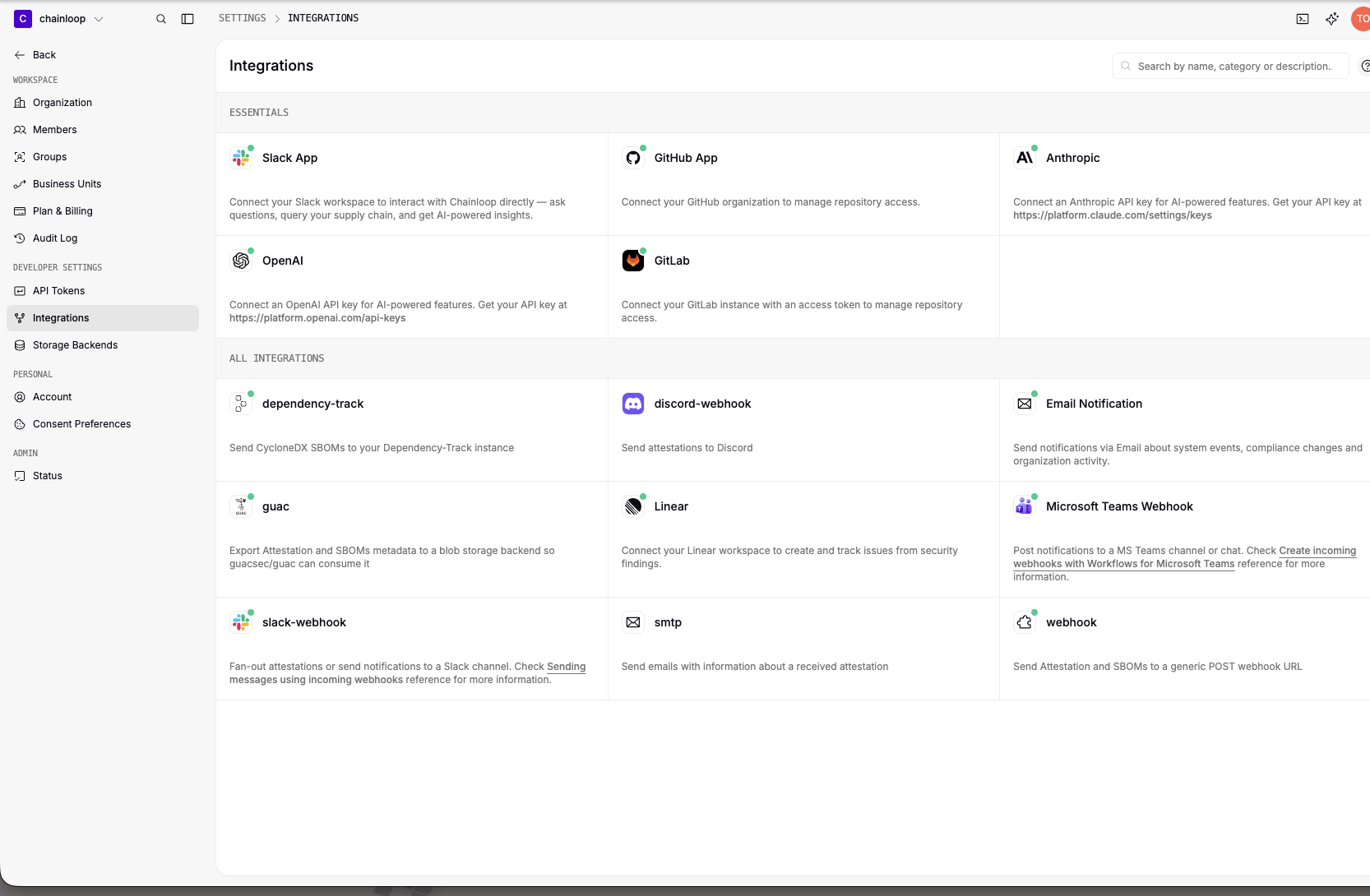 Current available notification integrations include:
* Email (using instance SMTP server)
Email Notification requires SMTP configuration at the instance level. If you
don't see this integration available, please contact your Chainloop
administrator to configure SMTP settings. For detailed instance configuration
instructions, refer to the [SMTP configuration
guide](/guides/deployment/platform#step-7-optional-setup-smtp-configuration).
* Microsoft Teams (webhooks).
You can find information on how to create a Teams webhook URL in the
[Microsoft Teams
documentation](https://support.microsoft.com/en-us/office/create-incoming-webhooks-with-workflows-for-microsoft-teams-8ae491c7-0394-4861-ba59-055e33f75498).
* Slack webhooks. Check [Slack documentation](https://docs.slack.dev/messaging/sending-messages-using-incoming-webhooks/) to know how to configure them.
More channels will be added in future releases.
## Managing Notification Preferences
Users can manage notification preferences at different levels:
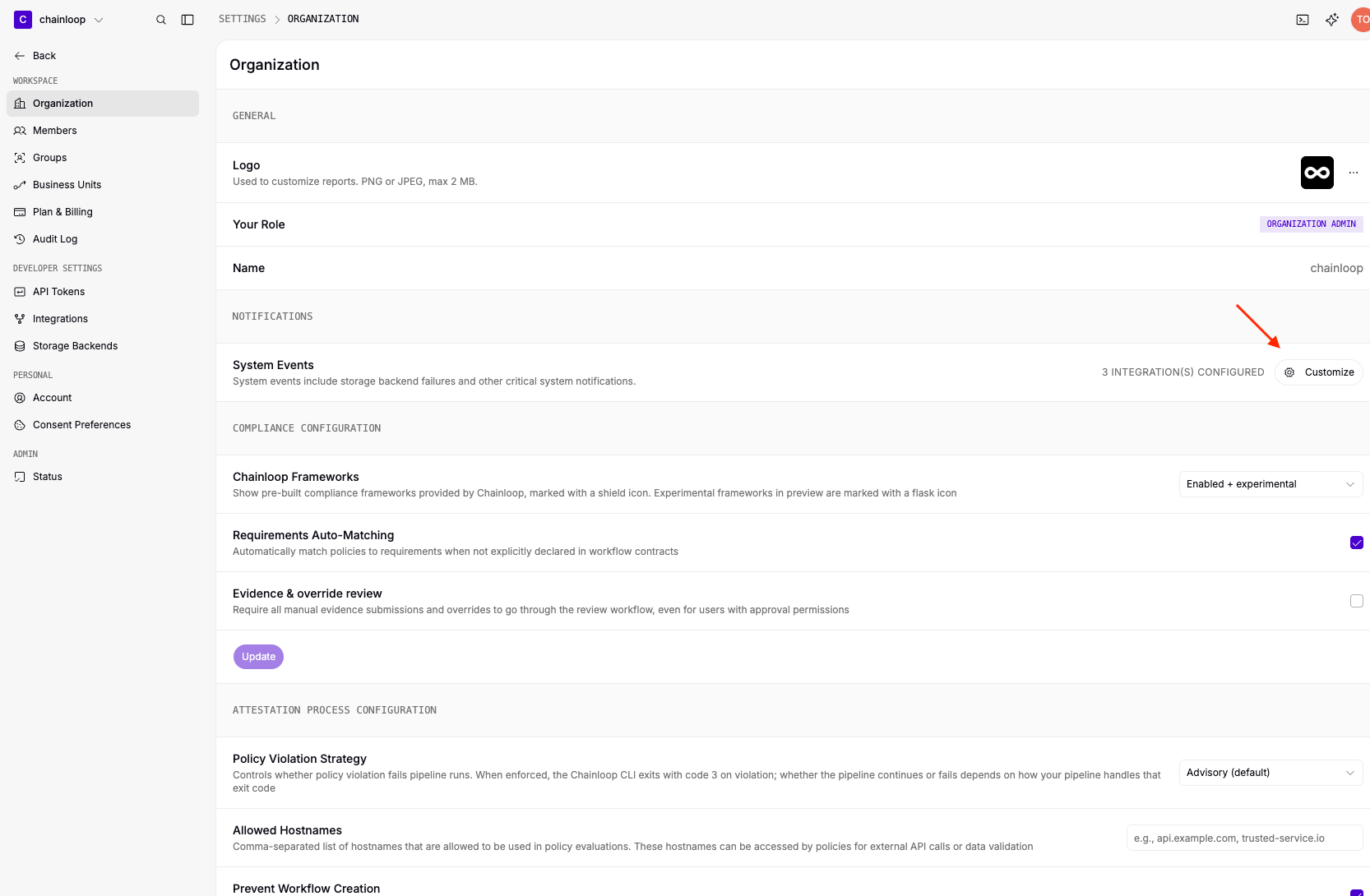
* **Organization notifications**: managed by Organization Oweners and Admins in the Settings > Organization > Notifications section.
Current available notification integrations include:
* Email (using instance SMTP server)
Email Notification requires SMTP configuration at the instance level. If you
don't see this integration available, please contact your Chainloop
administrator to configure SMTP settings. For detailed instance configuration
instructions, refer to the [SMTP configuration
guide](/guides/deployment/platform#step-7-optional-setup-smtp-configuration).
* Microsoft Teams (webhooks).
You can find information on how to create a Teams webhook URL in the
[Microsoft Teams
documentation](https://support.microsoft.com/en-us/office/create-incoming-webhooks-with-workflows-for-microsoft-teams-8ae491c7-0394-4861-ba59-055e33f75498).
* Slack webhooks. Check [Slack documentation](https://docs.slack.dev/messaging/sending-messages-using-incoming-webhooks/) to know how to configure them.
More channels will be added in future releases.
## Managing Notification Preferences
Users can manage notification preferences at different levels:
* **Organization notifications**: managed by Organization Oweners and Admins in the Settings > Organization > Notifications section.
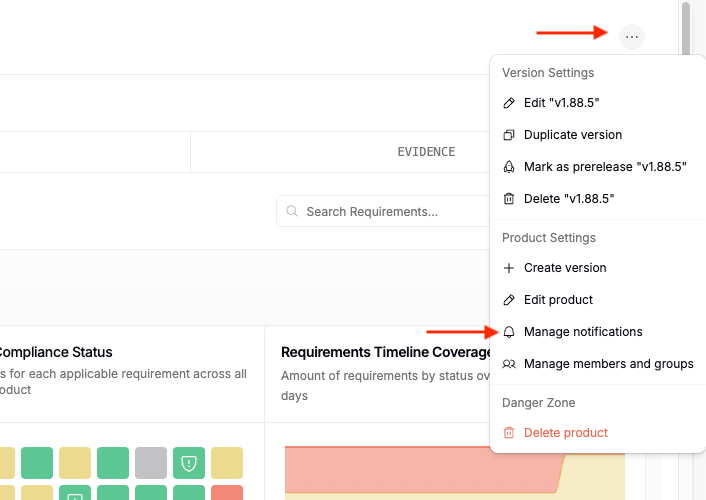
 * **Product notifications**: managed by Product Admins through the product actions menu, under Manage notifications.
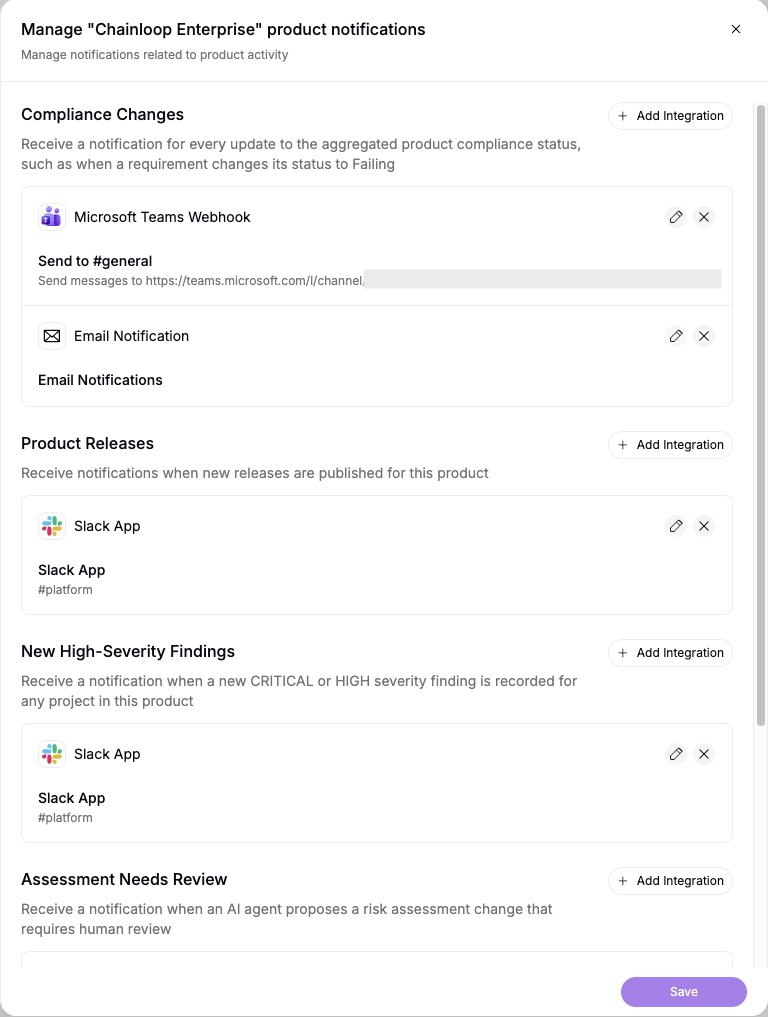
 To enable notifications for an event type, click **Add Integration** in the respective section and choose the channel:
 To this date, these are the events that can trigger notifications:
| Event | Description | Scope | Available Channels |
| ------------------------- | ---------------------------------------------------------------------------------- | ------- | -------------------------------------------------------- |
| Storage Backend Unhealthy | Triggered when the storage backend becomes unhealthy. | Org | Email (to Org Admins and Owners), Microsoft Teams, Slack |
| Integration Unhealthy | Triggered when one of the configured integrations becomes unhealthy. | Org | Email (to Org Admins and Owners), Microsoft Teams, Slack |
| Product Compliance Change | Triggered when there is a change in the aggregated compliance status of a Product. | Product | Email (to Product Admins), Microsoft Teams, Slack |
| Product Release | Triggered when a new release is made for a Product. | Product | Email (to Product Admins), Microsoft Teams, Slack |
To this date, these are the events that can trigger notifications:
| Event | Description | Scope | Available Channels |
| ------------------------- | ---------------------------------------------------------------------------------- | ------- | -------------------------------------------------------- |
| Storage Backend Unhealthy | Triggered when the storage backend becomes unhealthy. | Org | Email (to Org Admins and Owners), Microsoft Teams, Slack |
| Integration Unhealthy | Triggered when one of the configured integrations becomes unhealthy. | Org | Email (to Org Admins and Owners), Microsoft Teams, Slack |
| Product Compliance Change | Triggered when there is a change in the aggregated compliance status of a Product. | Product | Email (to Product Admins), Microsoft Teams, Slack |
| Product Release | Triggered when a new release is made for a Product. | Product | Email (to Product Admins), Microsoft Teams, Slack |